OBD JScan
- 4.7
- Rating
- 100.00K
- Installs
- Free
- Price
 Analysis by App-foxy
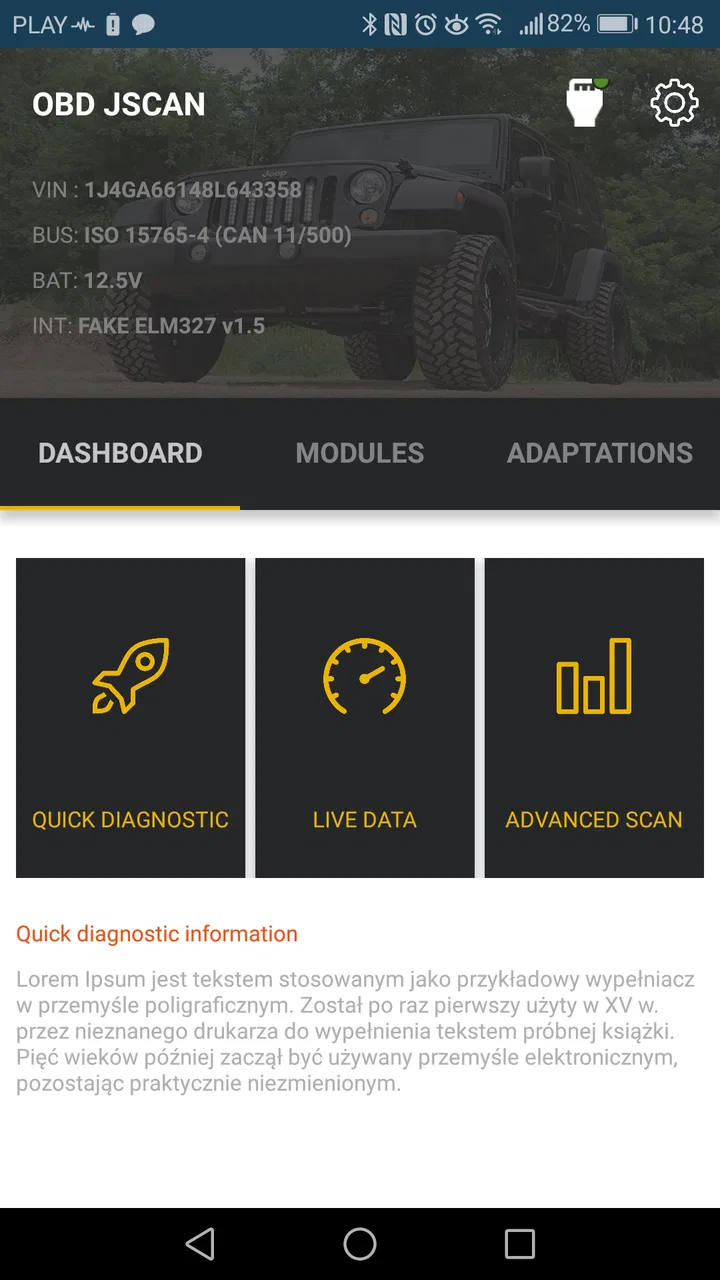
When a dashboard warning appears on a Jeep, Chrysler, or Dodge, the first question is usually simple: is this a minor sensor issue, or is the vehicle telling me something important? OBD JScan is built for that exact diagnostic moment. It is an Android and iOS automotive app from Clever Software that connects the familiar OBD diagnostic idea with vehicles from these three brands. I see it as a tool for owners who want more information than a basic warning-light reader provides, but who also understand that reading a vehicle is not the same as repairing it.
My overall impression is positive, with an important condition: this is most useful when you approach it carefully. The app can make vehicle diagnostics more accessible, yet the value depends heavily on using a compatible adapter, selecting the correct vehicle information, and knowing what a code actually means before clearing anything. It is free to install, aimed at Everyone, and works from Android 5.0 onward. Optional purchases range from $0.99 to $169.99 per item, so the free entry point is convenient, but the total cost can vary depending on how deeply you want to use it.
What makes this diagnostic app worth considering
The strongest reason to try this app is its narrow focus. Instead of presenting itself as a universal scanner for every manufacturer, it concentrates on Jeep, Chrysler, and Dodge vehicles. That focus matters because brand-specific diagnostics can expose information that a simple generic reader may not show. In everyday use, a basic reader might tell me that a fault exists, while a more specialized tool can help me understand which vehicle system deserves attention first.
You May Also Like

 Google Keep - Notes and lists
Google Keep’s Quiet Growth Shows the Appeal of Simpler Notes
As mobile work gets busier, Google Keep keeps winning a simple contest: capture a thought quickly, find it later, and get on with the day.

 Blood Strike: 2.5 Anniversary
Blood Strike’s Loadouts Turn Every Drop Into a Tactical Gamble
A close look at Blood Strike’s custom loadouts: how fast access to signature weapons reshapes its battle royale rhythm, rewards preparation, and narrows the gap between fights.

 Pandora - Music & Podcasts
Pandora’s Music Is Easy to Start, but Harder to Recover
Pandora’s strength is its low-effort path from a seed to a station. Its weak spot is how much confidence it asks you to place in connection, setup, and quiet recovery.

 8 Ball Pool
 Is Built on Rivalries, Rematches, and Routine
A close look at the rivalries, rematches, shared routines, and unanswered safety questions that turn a quick pool match into a persistent mobile community.

 Samsung Music
’s Quiet Strength Is Playing What You Already Own
Its reach comes less from spectacle than from dependable access to a personal library. That simplicity is both the app’s strongest retention engine and its ceiling.

 AccuWeather: Weather Radar
AccuWeather Review: A Quick, Clear Forecast for Everyday Decisions
For everyday plans, the best forecast is the one you can understand quickly. AccuWeather makes rain timing, radar, and local conditions easy to act on, with a few trade-offs.
More From Our News Desk



I would not treat the app as a replacement for a professional workshop scanner. I would treat it as a bridge between guessing and informed conversation. If my vehicle shows a warning light, I can use the app to gather useful diagnostic context before calling a mechanic. That can help me describe the problem more clearly, avoid replacing a part based only on a vague assumption, and decide whether the car should be driven or inspected immediately.
The app has reached a 4.7 average from around 3K ratings, with over 100K installs. Those figures suggest that it has found a real audience among owners of the supported brands. They do not guarantee that it will work equally well with every model, trim, adapter, or vehicle year, so I would still check compatibility before paying for anything. The developer is Clever Software, and the current version is listed as v28.05.2026.13:45.
Trust begins with knowing what the app is—and what it is not
I trust a vehicle diagnostic app more when it encourages a clear separation between observation and action. OBD JScan can help reveal vehicle information, but a displayed code is not automatically a failed component. A code may point to a circuit, a communication problem, a condition detected by a sensor, or an issue caused by another system. Clearing it without recording the details first can remove useful evidence.
That is why my preferred workflow starts with documentation. Before changing settings or erasing faults, I would note the warning message, take a screenshot if the app allows it, record the vehicle’s symptoms, and write down when the problem appeared. This is a small habit, but it prevents a common mistake: using a diagnostic tool as though the reset button were the repair.
The app’s category is Auto & Vehicles, which fits its practical purpose. It is not designed as entertainment or casual customization. Its audience includes owners who perform basic checks themselves, enthusiasts who want more visibility into their vehicles, and drivers who want better information before visiting a repair shop. Someone who only wants a universal, one-button scan for many unrelated vehicle brands may find a general-purpose alternative more convenient.
Connection and setup deserve patience
As with any phone-based OBD tool, the app is only one part of the system. You also need a compatible adapter and a vehicle with the relevant diagnostic access. The adapter is the physical link between the car and the phone, so connection problems can come from the adapter, the phone’s wireless settings, the vehicle’s ignition state, or compatibility rather than from the app itself.
I would set it up while parked, with the ignition state recommended for the vehicle and enough time to troubleshoot calmly. Trying to pair everything beside a busy road is a poor idea. A stable connection is particularly important before reading multiple modules or changing any vehicle configuration. If the connection drops during a simple scan, I would reconnect and verify the result. If it drops during a configuration change, I would avoid repeating actions blindly and inspect the vehicle carefully first.
One practical tip is to use a dedicated adapter rather than assuming that the cheapest generic device will provide the same experience. The app’s brand-specific purpose makes the adapter choice more important than it might be for a basic code reader. A low-cost adapter may be adequate for reading a simple fault, but reliability becomes more important when the app is communicating with several vehicle systems or when the user is considering an optional function.
Reading faults is useful, but interpretation is the real skill
The most obvious use case is a warning light. Imagine a driver notices an engine warning before a weekend trip. Instead of immediately buying a sensor or ignoring the light, the driver can connect the app, read the available diagnostic information, and save the result. That does not produce a final diagnosis, but it gives the driver a more informed starting point.
I especially like this approach for intermittent problems. A warning that disappears before reaching a workshop can be difficult to explain. Capturing the information while the symptom is present may help a technician reproduce the issue or decide which area to test. The app is therefore most valuable as a record-keeping and communication aid, not just as a code display.
There is also a safety trade-off. If the vehicle has serious symptoms—loss of braking, overheating, unusual smoke, steering problems, or a major change in engine behavior—I would not let a reassuring-looking scan result determine whether I continue driving. A diagnostic app can report electronic information, but it cannot inspect every mechanical condition. In those situations, professional inspection is the better choice.
Brand focus can be an advantage and a limitation
Compared with a generic OBD reader, the appeal here is the concentration on Jeep, Chrysler, and Dodge vehicles. A generic reader is often easier to recommend to a household with several different brands, especially if the goal is simply to check common engine-related codes. OBD JScan makes more sense when the vehicle in front of me belongs to its supported family and I want a tool centered on that ecosystem.
The trade-off is flexibility. If I regularly work on vehicles from Toyota, Ford, Volkswagen, or other manufacturers, I would not expect this app to become my only diagnostic solution. I would choose a broader scanner for mixed-brand use, then consider this app when I specifically need a more focused tool for a compatible Jeep, Chrysler, or Dodge.
That focus also means I would verify the exact vehicle before purchasing an optional capability. Brand name alone is not enough; model, year, equipment, and communication architecture can affect what is available. The safest habit is to begin with the free installation, connect only after checking the vehicle details, and purchase additional functions only when I understand what they are intended to do.
Where user control matters most
Vehicle apps can move quickly from harmless viewing to consequential changes. Reading information is generally a lower-risk activity than modifying configuration, enabling a function, or clearing a fault. I would keep those activities separate in my mind and never treat them as equally safe simply because they appear in the same interface.
Before using an advanced function, I would ask three questions: what exactly will change, can I restore the previous setting, and what happens if the phone or adapter disconnects? If I cannot answer those questions, I would stop and look for the vehicle’s service documentation or ask a qualified technician. This is not unnecessary caution; a setting that seems minor can affect convenience features, warning behavior, or how a vehicle communicates with its modules.
Another useful practice is to make one change at a time. If several settings are altered together and the vehicle behaves differently afterward, it becomes difficult to identify the cause. Recording the original state, changing only the intended item, and testing the vehicle in a safe place gives me a much clearer path back if something feels wrong.
The app’s optional purchase range is wide, from $0.99 to $169.99 per item. That makes it important to think of purchases as capabilities rather than as a single upgrade. I would not pay for a feature merely because it is visible in the interface. I would first decide whether it solves a real problem on my vehicle and whether the same result would be safer or cheaper through a workshop.
Privacy and data-sensitive moments
My trust in a diagnostic app is not based only on its rating or the number of installs. I also pay attention to the moments when the app interacts with the vehicle, the phone, and any account or purchase controls presented during use. A diagnostic session can involve vehicle identifiers, fault information, connection details, and purchase records, so I prefer to understand what the app is asking me to authorize before continuing.
I would review the permissions shown by my phone during installation and connection rather than approving everything automatically. If a permission appears unrelated to connecting to the adapter or using the diagnostic workflow, I would pause and investigate it through the operating system’s controls. The important point is not to assume that a vehicle app is harmless simply because it displays technical information.
I would also avoid sharing screenshots publicly without checking them first. Diagnostic screens can contain vehicle-specific information, and photos taken during troubleshooting may reveal registration details, location clues, or other personal context. Keeping a private record is useful; posting every screen in a public group is not always wise.
Account and purchase control matter too. Because optional items can be substantially more expensive than a casual app purchase, I would use the platform’s purchase authentication and review the confirmation screen carefully. If another family member uses the phone, I would make sure accidental purchases are not possible. This is a simple user-controlled safeguard and is more reliable than assuming every tap will be obvious.
A realistic ownership scenario
Consider a driver whose Dodge develops an intermittent warning during a commute. The vehicle still feels normal, so the driver parks safely, connects the adapter, and opens the app. Rather than clearing the warning immediately, the driver records the diagnostic result, notes the outside conditions and recent maintenance, and disconnects. Later, the driver can provide that information to a repair shop.
If the warning returns with rough running or reduced power, the driver has a stronger basis for choosing not to continue driving. If the result points toward a system that was recently serviced, the driver can mention that detail to the technician. The app has not magically repaired the vehicle, but it has reduced uncertainty and improved the quality of the handoff between owner and mechanic.
A different scenario shows where I would be more cautious. An enthusiast wants to change a vehicle setting because an online discussion says it is possible. The app may make the change appear accessible, but that does not mean the setting is appropriate for every configuration. I would verify the exact vehicle, save the original state, change one item only, and test it safely. If the purpose is unclear or the result affects safety-related behavior, I would leave it to a professional.
Who will get the most from it
I would recommend this app to a Jeep, Chrysler, or Dodge owner who enjoys understanding the vehicle, wants more diagnostic context than a basic reader offers, and is comfortable following a careful process. It can also suit a technically minded driver who wants to arrive at a workshop with useful observations instead of only saying that a warning appeared.
It is less suitable for someone who expects a phone app to identify every mechanical fault with certainty. It is also not my first choice for a mixed-brand household, a driver who wants a completely hands-off experience, or anyone who is likely to change settings without recording the original configuration. In those cases, a professional diagnostic service or a broad multi-brand scanner may be a better fit.
New users should begin with low-risk tasks: establish the connection, identify the vehicle correctly, read information, and save notes. Only after becoming familiar with the interface would I consider optional functions. This gradual approach also helps reveal whether the adapter and vehicle combination behave reliably before money is spent.
My cautious verdict
OBD JScan is a focused automotive diagnostic app with a clear audience and a practical role. I like it because it can turn a vague dashboard warning into a more useful conversation, especially for owners of compatible Jeep, Chrysler, and Dodge vehicles. Its free starting point makes experimentation easier, while the Everyone age rating and support for Android 5.0 or later keep the basic barrier to entry fairly low.
Still, the app rewards restraint more than curiosity. The most responsible use is to read, document, compare symptoms, and then decide whether professional help is needed. Clearing codes or changing settings should come later, with a backup plan and a clear understanding of the result. The optional purchase range also means I would choose capabilities deliberately rather than treating every available function as necessary.
My recommendation is therefore positive but specific: choose it if you own a supported vehicle and want a brand-focused diagnostic companion, not if you are searching for a universal scanner or an automatic repair solution. The best feature is the extra information it gives you before you make a decision. Used that way, OBD JScan can be a genuinely useful part of responsible vehicle ownership without encouraging the false confidence that a phone alone can replace a trained mechanic.
FAQs for OBD JScan
01What is OBD JScan and what does it do?
OBD JScan is a diagnostic tool and app designed for car enthusiasts and professionals. It connects to your vehicle's OBD-II port, providing detailed insights into your car's performance and health. The app allows users to read diagnostic trouble codes, monitor real-time data, and even configure vehicle settings, making it a versatile tool for maintaining and optimizing vehicle performance.
02Is OBD JScan compatible with my vehicle?
OBD JScan is compatible with a wide range of vehicles that support the OBD-II protocol, typically those manufactured after 1996. However, the app may offer specific features depending on the make and model of your vehicle. It's advisable to check the app's compatibility list or consult the developer's website to ensure it supports your car's specific needs.
03Do I need any additional hardware to use OBD JScan?
Yes, to use OBD JScan, you will need an OBD-II Bluetooth adapter, which connects to your car's diagnostic port. This adapter facilitates communication between your vehicle and the app on your smartphone or tablet. Ensure the adapter is compatible with OBD JScan for a seamless experience.
04Can I use OBD JScan to clear error codes?
Yes, OBD JScan allows users to read and clear diagnostic trouble codes. This feature is particularly useful for identifying and resolving issues without the need for a mechanic. However, it's important to understand the codes and their implications before clearing them to avoid potential damage to your vehicle.
05Is OBD JScan user-friendly for beginners?
OBD JScan is designed with a user-friendly interface that caters to both beginners and professionals. The app provides clear instructions and intuitive navigation, making it accessible to users with varying levels of technical expertise. Additionally, numerous online resources and support communities can assist new users in maximizing the app's capabilities.
Pros
- User-friendly interface for easy navigation.
- Comprehensive vehicle diagnostics and data.
- Supports a wide range of car models.
- Real-time data monitoring available.
- Cost-effective compared to dealership tools.
Cons
- Requires a compatible OBD-II adapter.
- May not support all vehicle features.
- No offline mode available.
- Limited support for older vehicles.
- In-app purchases for advanced features.

OBD JScan
Gallery